
Exertion score
A 0–10 score for how much cardiovascular load you've taken on today, built from minutes in each heart-rate zone. A target range tells you how hard to go based on this morning's recovery.
Free
Coming soon to theApp Store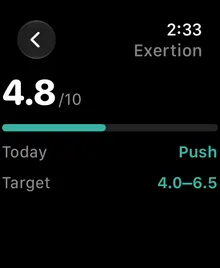
How exertion is calculated
- Your heart-rate zones. Pulse Coach uses your Apple Watch heart-rate zones where iOS makes them available. Otherwise it estimates your maximum heart rate with the Tanaka formula (211 − 0.64 × age) and splits it into five standard zones by percentage of max heart rate.
- Weighted minutes. Every heart-rate sample from your Apple Watch is put into a zone. Each zone up counts roughly twice as much as the one below, so 10 minutes near your max adds far more load than 10 minutes of walking.
- A 0–10 scale. The weighted total is compressed onto a 0–10 curve, so the first hour of easy movement moves the number quickly and very hard days flatten out near the top instead of running off the scale.
Where a workout has Apple’s own time-in-zone data, Pulse Coach uses it.
Today’s target range
Your exertion target depends on this morning’s recovery score:
| Recovery | Target exertion |
|---|---|
| High (67–100) | 5–8 |
| Moderate (34–66) | 3–6 |
| Low (0–33) | 1–3 |
Your training goal shifts the range. Peak raises the ceiling by one point, and Recovering lowers both ends by one. Building and Maintaining keep the standard range.
Why it matters
Recovery tells you what you can absorb. Exertion tells you what you actually did. Pairing the two keeps hard days hard and easy days easy. That’s the pattern linked with steady progress and fewer overreaching slumps. See signs of overtraining.
Frequently asked questions
Is exertion the same as WHOOP strain?
It's the same idea, a daily measure of cardiovascular load from heart rate, but on a 0–10 scale and calculated from your Apple Watch heart rate on your iPhone. The numbers aren't interchangeable with WHOOP's 0–21 strain.
Does exertion count strength training?
It counts the heart-rate response to any activity, including lifting. Heavy lifting with long rests raises heart rate less than running does, so it can score lower than it feels.
More features
Recovery score
A daily 0–100 recovery score from your Apple Watch HRV, resting heart rate and sleep, measured against your own 60-day baseline. Calculated on-device.
Sleep score, sleep debt and bedtime target
Track sleep debt over 14 nights, see a sleep score from duration, deep and REM sleep and efficiency, and get a bedtime target that pays the debt back.
Journal and habit impacts
Tag alcohol, late meals, caffeine, stress, sauna and more. Pulse Coach shows how each habit changes your next-day recovery and that night's sleep.
On-device AI health coach
Ask questions about your recovery, sleep and habits. Answers come from Apple Intelligence running on your iPhone, so your data never reaches a server.
Guided routines and HIIT interval timer
Guided breathwork, mobility, stretching, NSDR deep rest and bodyweight HIIT circuits with voice cues, 3-2-1 beeps, haptics and a Live Activity.
Apple Watch app, complications and widgets
See recovery, exertion and sleep on your wrist with the Pulse Coach Apple Watch app and complications, plus iPhone Home Screen and Lock Screen widgets.
Trends and weekly report
Charts for recovery, HRV, resting heart rate, sleep and exertion over 7, 30 and 90 days, plus a weekly report on what changed and what to focus on.