
Journal and habit impacts
Tag your day in a few taps. Once a habit has shown up on at least three days, Pulse Coach shows how your next-morning recovery and that night's sleep differ on days with it versus days without.
Free + Pro
Coming soon to theApp Store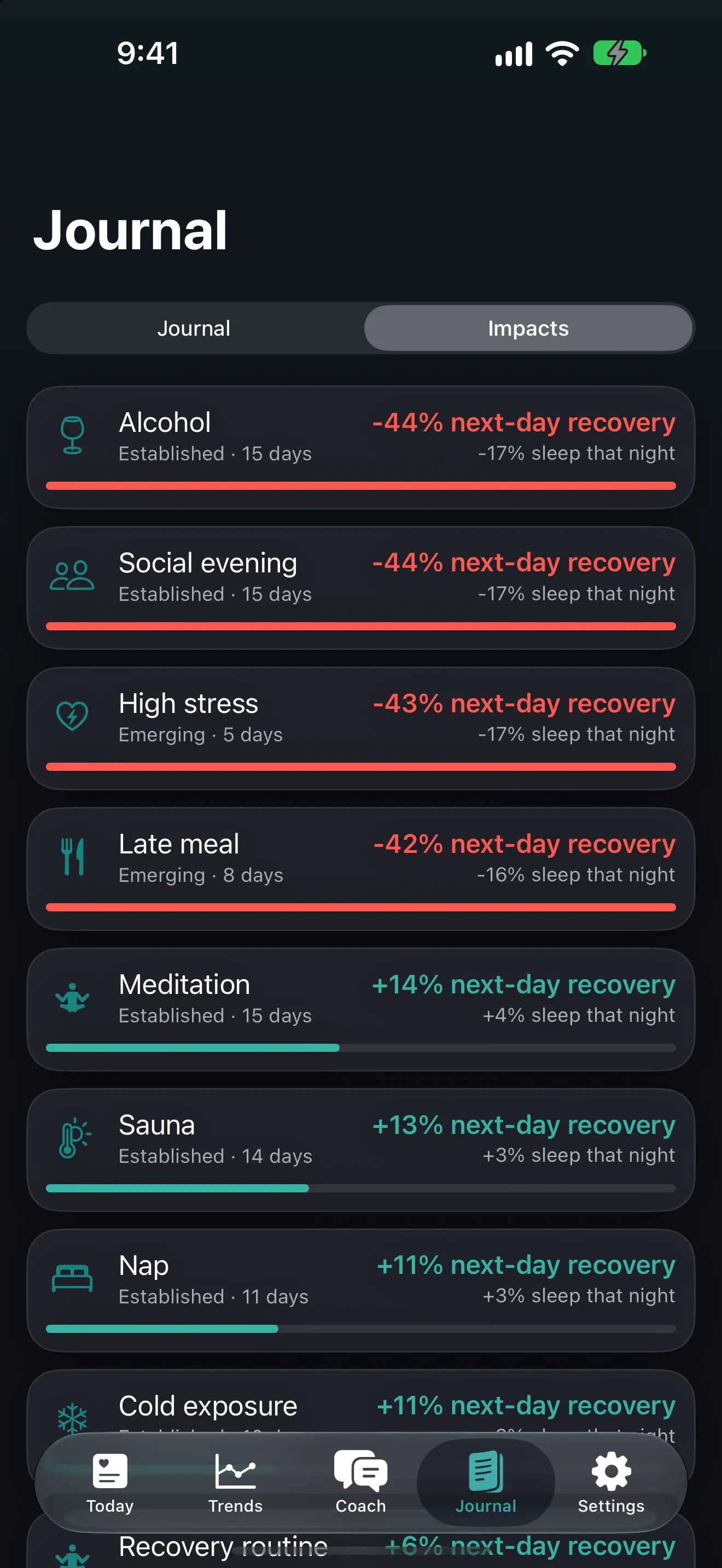
17 tags, one tap each
Alcohol · Caffeine · Late caffeine · Late meal · High stress · Meditation · Sauna · Cold exposure · Travel · Illness · Magnesium · Creatine · Late screen time · Social evening · Fasting · Nap · Recovery routine. Add a note if you want more detail.
What an impact shows
For each tag, Pulse Coach compares:
- Next-day recovery on days after you used the tag versus days you didn’t, as a percentage.
- Same-night sleep, how much longer or shorter you slept, when there’s enough sleep data.
The list is ranked by strength, so your biggest levers come first. The free plan shows your strongest impact; Pulse Pro shows all of them.
Private by design
Your journal is stored only on your iPhone. Delete it any time in Settings → Privacy. Nothing is uploaded, so the habits you tag (drinks, stress, illness) stay yours.
Ask the coach
On iPhones with Apple Intelligence, the AI coach uses your impacts to answer questions like “What’s my biggest recovery lever?” with your own numbers.
Frequently asked questions
How many days of journaling do I need?
A tag needs at least 3 days before Pulse Coach shows its impact, and the result is marked Emerging until there's more data. A week or two of tagging usually surfaces the first clear patterns.
Does an impact prove that a habit causes low recovery?
No. An impact compares your days with and without a tag. It's a strong hint, not proof. Other things can travel together, like late meals on social evenings. Treat it as a personal experiment worth testing.
More features
Recovery score
A daily 0–100 recovery score from your Apple Watch HRV, resting heart rate and sleep, measured against your own 60-day baseline. Calculated on-device.
Exertion score
A 0–10 exertion score from time in each Apple Watch heart-rate zone, with a daily target range matched to your recovery and training goal.
Sleep score, sleep debt and bedtime target
Track sleep debt over 14 nights, see a sleep score from duration, deep and REM sleep and efficiency, and get a bedtime target that pays the debt back.
On-device AI health coach
Ask questions about your recovery, sleep and habits. Answers come from Apple Intelligence running on your iPhone, so your data never reaches a server.
Guided routines and HIIT interval timer
Guided breathwork, mobility, stretching, NSDR deep rest and bodyweight HIIT circuits with voice cues, 3-2-1 beeps, haptics and a Live Activity.
Apple Watch app, complications and widgets
See recovery, exertion and sleep on your wrist with the Pulse Coach Apple Watch app and complications, plus iPhone Home Screen and Lock Screen widgets.
Trends and weekly report
Charts for recovery, HRV, resting heart rate, sleep and exertion over 7, 30 and 90 days, plus a weekly report on what changed and what to focus on.